![SignalPET White-1.png]](https://docs.signalpet.com/hs-fs/hubfs/SignalPET%20White-1.png?height=27&name=SignalPET%20White-1.png)
SignalPET x Vetspire Integration Setup guide
Automatically push SignalPET reports into your Vetspire patient record.
The SignalPET - Vetspire API integration allows SignalPET reports to be automatically pushed directly into the patient page in Vetspire. This helps keep all diagnostic insights centralized in one place, reduces manual uploads, and ensures your team can easily access reports within the patient’s medical record.
How to enable the integration in Vetspire.
- Click the burger icon > navigate to the Admin section > select PIMS integration.
- In the PIMS System field, choose 'VetSpire (via API)', and the configuration form will open.
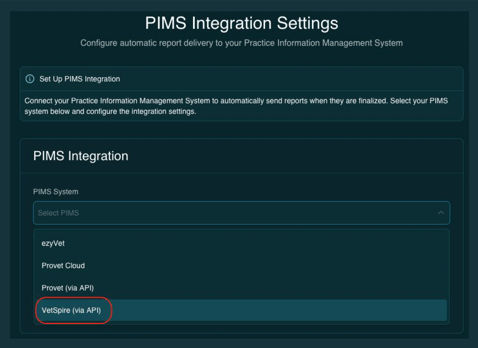
Enabling the SignalPET integration takes just a few clicks (screenshots from Vetspire below):
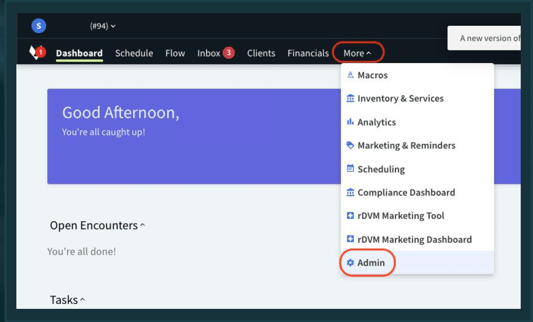
- In Vetspire, go to More
- Navigate to Admin
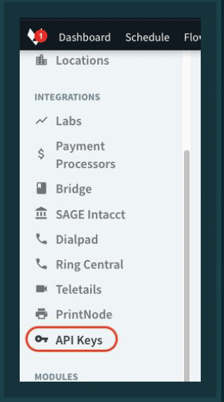
- Under the Integrations section, click API Keys
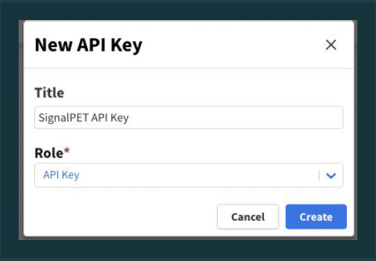
- Click "Create New Key"

- Fill the Title: "SignalPET API Key" Role: "API KEY"
- Click Create
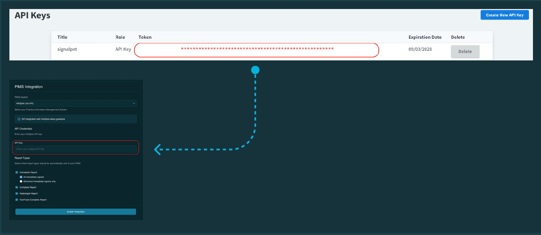
- Copy the newly created API Key and paste it into the API Token field on the PIMS integration page in the SignalPET app.
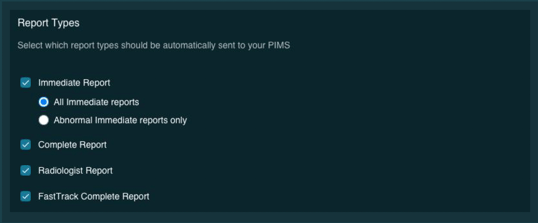
- Use the report selection options to choose which reports are sent to Vetspire. Check the reports you want to include - only those will be automatically added to the patient's page
- Click Save Changes.
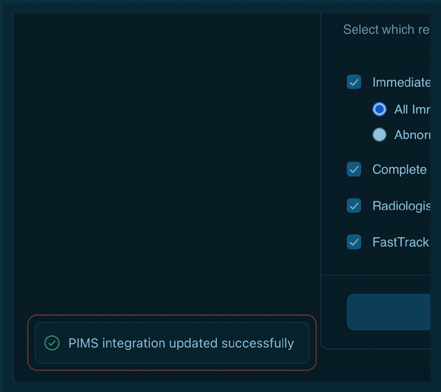
If the connection with Vetspire is successful, a confirmation message will appear, as shown in the screenshot below. If an error messages appears instead, please contact support
Once enabled:
-
SignalPET reports will be pushed directly into the relevant Vetspire patient page
-
Your selected report types will appear automatically
- Your workflow remains uninterrupted, with no manual uploads needed
If you have any questions or would like help choosing which report types to enable, the SignalPET team is happy to assist.